I build client WordPress sites with AI in the loop. Month one: thrilled. Month two: annoyed. Month three I got consistent output - glad I wrote the house rules down before handoff day turned into a scavenger hunt.
The Thing Nobody Warns You About
The AI wasn’t bad. It was too creative. Ask for the same kind of feature on Tuesday and Thursday, and you get two different versions. Different files. Different names. Different fixes for the same problem. Both work. Neither fits the rest of the project.
It’s like a new contractor every morning - skilled, opinionated, and blind to what yesterday’s contractor built.
That’s not a code problem. It’s a consistency problem. Once I saw that, the fix was obvious.
AI Isn’t a Developer - It’s a Fast New Hire
A new teammate on day one doesn’t know your file names or your definition of done. They don’t know your existing helpers. They don’t know which mistakes the team already made once.
So you give them a short guide. After that, they stop guessing and start matching.
AI works the same way. Plenty of skill, zero memory of your project. Every new chat is day one.
I learned this the annoying way on one build: Tuesday’s testimonial card and Thursday’s team grid landed in different folders, with different helper names, doing the same job. Same project, same me, same prompts more or less.
Write down your house rules and put them where the AI will actually read them.
The Real Win: Reusable Code for the Repeating 80%
About 80% of what I build is the same patterns in different clothes - blocks, cards, forms, lists, banners. That’s true in WordPress and in most projects.
Most people ask AI to build each feature from scratch. That feels fast, but every feature drifts a little. You spend the time you saved cleaning up later.
Flip it: use AI to build the reusable code for that 80% - helpers, templates, shared boilerplate, a small set of “do it like this” examples. After that, new work is just new content in the same shape.
The valuable output isn’t the feature. It’s the reusable code that makes the next forty features look the same. AI is great at that work because it’s repetitive - exactly where humans slip.
When that layer exists:
- New work looks the same no matter which day or chat you open
- Review focuses on markup and edge cases - not the same opener every time
- Anyone opening the project can read one file and understand the next forty
On client builds, that’s the gap between a repo someone else can pick up and a repo only you can decode.
The win isn’t “AI was fast.” It’s “every future feature comes out the same.”
(There’s still ~20% that doesn’t fit the pattern - that’s where improvement and creativity live. I’ll cover that at the end.)
The 4-Step Process: Build the 80% Layer
This is what I do on client WordPress builds. Same idea for any stack where AI assists with the typing.
Have AI build the reusable 80%, then use it for every new feature.
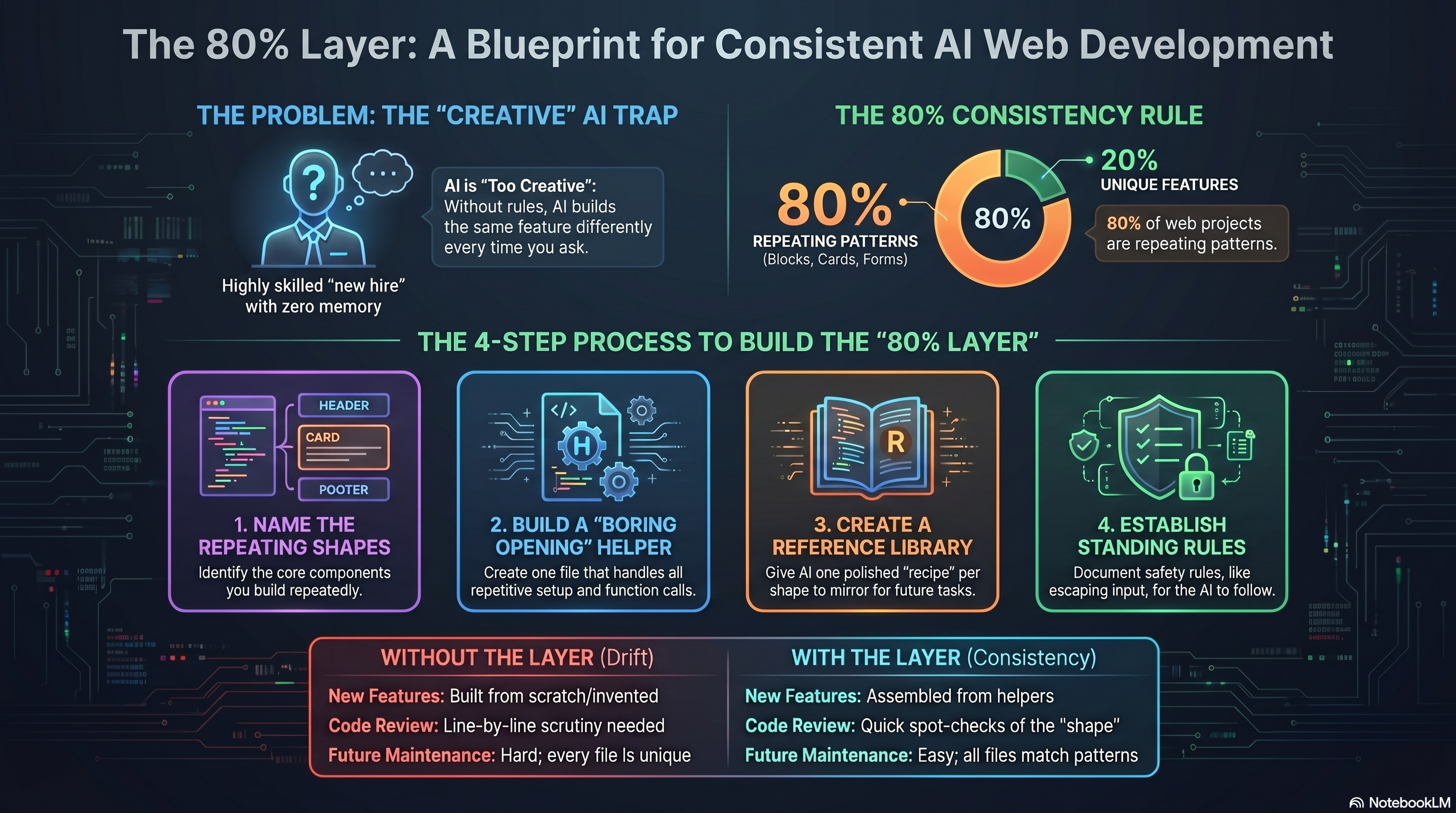
Step 1 - Name What Repeats
Look at recent projects. What do you build again and again? For me, it’s content blocks - pages are mostly blocks stacked together. Testimonial cards, team grids, banners - same job, different shapes until you name them.
Name each repeating shape. One line each. That’s what AI will build reusable code for. Skip this and nothing else clicks.
Step 2 - One Helper for the Boring Opening
Every shape starts with the same few lines of setup. On WordPress builds that’s usually registering the block, enqueuing assets, and pulling ACF fields. The opening of every block.php looks identical before the markup diverges.
First helper I tried was named block_setup(). Next chat invented init_block(). Same file, three names, zero consistency until I locked one function in inc/blocks/helpers.php.
Ask AI for one helper - something like jorap_block_open( $block_name ) in inc/blocks/helpers.php - that wraps that boilerplate and exposes a single function call.
This may be the most important file in the project. Every new feature starts the same way. AI calls the helper and moves on to the real work.
You’re not saving keystrokes. The first ~25 lines of every file match, so there’s nothing to drift on.
Step 3 - A Small Library of Reference Examples
With the helper in place, ask AI for one polished example per shape - one card block, one banner, one list. You don’t ship these as features. They’re references in something like inc/blocks/examples/card.php - the recipe book.
I skipped this once and asked for “a testimonial card like the other cards.” AI invented a fourth card style. It had nothing to point at.
“Build me a testimonial card” becomes “build me a card like examples/card.php.” AI copies well when you point at a file. It invents poorly when you don’t.
Step 4 - Rules Plus a Standing Instruction
Write down rules that aren’t taste - they’re safety. Mine look like:
- Escape user input on every field you render
- Match the project’s exact labels (typos break translations)
- Bump a timestamp when a config file changes (or sync breaks quietly)
A client name field rendered unescaped once - fine in staging, ugly in production. That’s when “escape everything” went into the rules doc instead of my head.
Ask AI to put five to ten rules in one plain-English doc in the project.
Add one instruction for every task: “Use the helper. Mirror the closest example. Follow the rules.” Put the doc and that line where the AI reads them first - a .cursor/rules file, a PROJECT.md, whatever you use.
That’s the contract. AI stops inventing and starts assembling from what you already built. New code looks like old code because the layer doesn’t leave much room for anything else.
What It Feels Like When the Layer Is in Place
With those four pieces set, working with AI gets calm. I ask for a block and the AI:
- Calls the helper for the opening
- Mirrors the closest reference example
- Follows the rules without me repeating them
- Says what it used so I can spot-check
I treat AI output like any other pull request - same review bar, same escape checks, same staging pass before it ships.
The result matches the rest of the codebase - same helper, same shape, same rules.
Not “wow, fast.” More like “of course it looks like that - it always does.” Boring in the best sense. Predictable. Easier to review and hand off. A second developer doesn’t need my chat history - they read helpers.php, skim examples/card.php, and the next block makes sense. The 80% that used to drift between chats stopped drifting.
The Other 20%
The rest doesn’t fit the template - custom integrations, odd animations, pages that behave differently per user. That’s not waste. It’s the part of the project where you’re allowed to improve things, try ideas, and be creative.
Locking down the 80% on purpose frees you here. You’re not fighting drift on every block, so you have attention for the work that actually needs a fresh take.
Don’t force the 80% system onto this bucket. Do add one guardrail: “If it doesn’t match an existing pattern, stop and ask.” Edge cases stay a conversation, not a confident wrong guess. Room to experiment stays.
Full system for the 80%. One light rule for the 20%. Creativity where it belongs.
What This Actually Changed for Me
Stop asking AI to build features. Ask it to build the layer that makes every feature match.
Using AI as a faster typist, one feature at a time, gives you speed and drift in equal measure. The layer is mostly a once-per-project cost, and every chat after it benefits. That hour on helpers.php paid for itself the first time I could skip the opener and jump straight to the markup.
These days I open a chat with one line: use the helper, mirror card.php, follow the rules doc. I still review every diff - I just stop rereading boilerplate I already trust. I check markup, escaping, and anything that broke the pattern. Helpers, examples, and rules live in the repo now - handoff day isn’t a scavenger hunt anymore.
I still get caught out. When a client invents a new ACF field label with a typo in it, nothing in the rules doc covers that. I find the unescaped output the hard way. That’s the 20% doing what the 20% does.
Not faster. Consistent. That’s what the next developer or client opening the repo gets - predictable structure and diffs worth reviewing. Glad I finally learned to protect that.
Share