I can’t quit Facebook entirely - Messenger is how too many people in my life actually reach me, and I’m glad that part still works. What I did quit, mostly, was scrolling the main feed.
It had become a mess. Random sponsored posts. Distant cousins arguing about politics. People I went to high school with pitching essential oils. Somehow almost nothing from the friends I actually wanted to keep up with.
Then I stumbled onto a setting Facebook built but doesn’t really advertise: the Favorites feed. It’s not a hack, not a third-party app - just a built-in feature most people don’t know exists. Messenger stays. The infinite feed mostly doesn’t.
What the Favorites Feed Actually Is
It’s a separate feed inside Facebook that only shows posts from people, pages, and groups you’ve manually marked as favorites. The algorithm doesn’t decide. You do.
I found it by accident. I was scrolling the menu for something else and tapped Feeds on a whim. I’d been fighting the wrong feed for years.
Your mom’s photos from her trip - yes. The local news page you actually read - yes. Group chats and ads from someone you barely remember adding in 2011 - gone.
Why I Keep Coming Back to It
Sunday morning test: open Favorites, scroll to the bottom, close the app. Ten minutes, maybe less. Mom’s trip photos, one church update, a friend’s kid milestone - done. No cousin politics, no sponsored reel hole.
The feed ends. That’s the part that changed things. There’s a bottom. I reach it. The app has nothing left to feed me.
I also stopped missing updates from people I actually care about. Close friends weren’t getting buried under noise anymore. No “people you may know” trap here. No suddenly-political post from someone I barely remember adding in 2011.
My phone time went down because the endless-scroll trap isn’t built into this feed. I check it, I close it.
Where Facebook Hid It (I Missed It for Years)
Facebook tucks this thing away pretty deep. I missed it for years because it’s buried under Feeds, not on the home screen where you’d expect it.
Checked August 2026: on desktop, Favorites still opens at facebook.com/?filter=favorites&sk=h_chr. Bookmark that if the menus move again.
Here’s the menu path as of that check. Screenshots below are older - if the labels drift, use the link first.
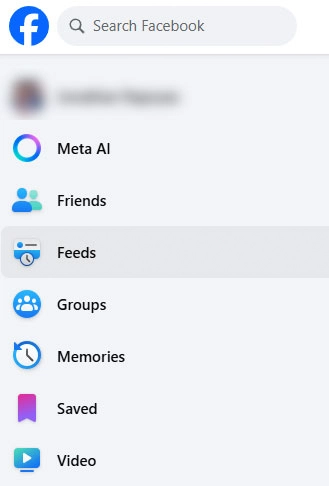
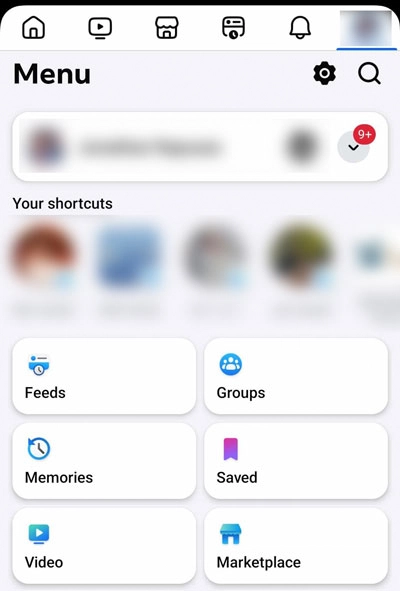
On your phone:
- Open the Facebook app.
- Tap the menu (three lines, usually bottom-right on iOS, top-right on Android).
- Scroll down until you see Feeds. It’s not at the top, you have to look for it.
- Tap Favorites.
On a computer:
- Open the Favorites feed URL, or look in the left sidebar for Feeds and click Favorites.
- If you can’t find “Feeds,” the sidebar may have collapsed it - expand it, or scroll the menu.
Who I Actually Put on the List
This is the fun part: deciding who gets in. The path is the same everywhere once you know it. Open the profile, page, or group. Tap the status button (Friends, Following, or Joined depending on what you’re looking at). Pick Favorites.
A Few Things I Learned by Overdoing It First
Start small. I added something like fifty people my first day. Too many. The whole point disappears if your favorites feed becomes just as cluttered as the main one. Fifteen to twenty is a better starting point.
Be honest about who matters right now. Pick close family and your three or four real friends. A local news page or hobby group you actually use is fine too. That’s usually it.
It’s private. Nobody gets a notification. Nobody can see your list. Add and remove people freely - they’ll never know.
The cap is 30 friends, pages, and groups combined. You’ll have a hard time even filling that.
Give It Five Minutes
Facebook gets a lot wrong, but this one feature is genuinely good - it just doesn’t get the spotlight it should. Five minutes to set up. Start with the obvious people in your life, try it for a week, adjust from there.
Your favorited friends won’t know. The regular home feed stays the same - Favorites is just another tab.
Open Feeds, tap Favorites, add ten people tonight, and use that feed instead of Home for one week. Messenger stays, and I’m thankful for that. The infinite scroll mostly does not.
Share